

















The problem
Jira Cloud’s administration permission is close to binary. A user is either a Jira administrator, in which case they can reach almost everything, or they are not, in which case they can reach almost nothing. There is no built-in way to say “this person may manage groups and users but must not touch permission schemes”, or “the release manager may create versions in this Space and nothing else”.
So teams do one of two things, and both are bad. They hand out Jira administrator to people who need one small slice of it, or they funnel every routine request — add a user to a group, add a value to a custom field, create a version — through the two or three people who already hold the rights. The first is a security problem. The second is a bottleneck.
What Secure Admin does
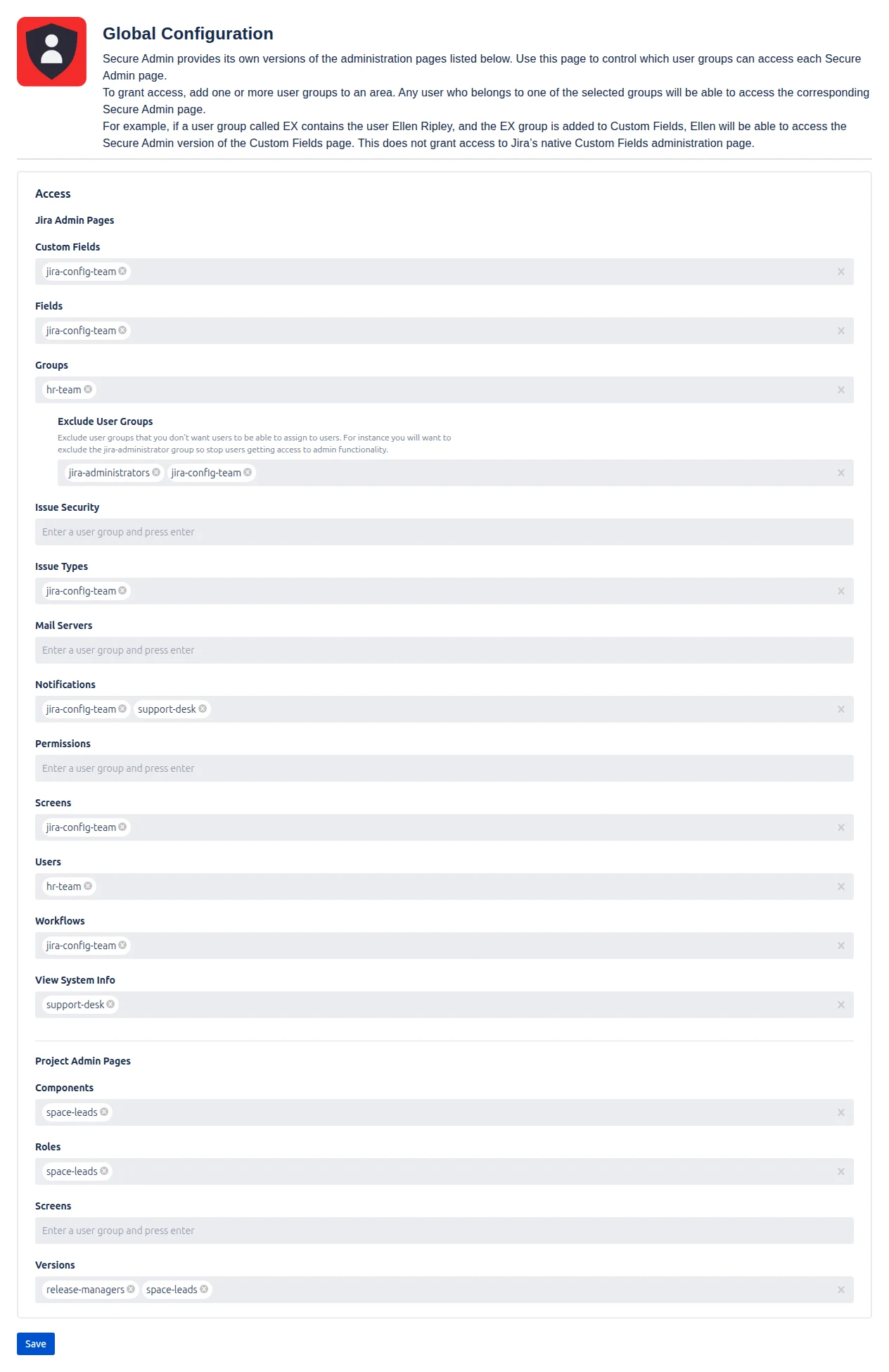
Secure Admin for Jira Cloud supplies its own versions of sixteen administration pages and lets a Jira administrator decide which user groups may use each one.
Twelve of them act on the whole site:
Custom Fields, Fields, Groups, Issue Security, Issue Types, Mail Servers, Notifications, Permissions, Screens, Users, View System Info and Workflows.
Four act on the Space the user is currently in:
Components, Roles, Screens and Versions.
Granting a page hands out that page and nothing else. It does not give anyone access to Jira’s own administration screens, and it does not make them a Jira administrator.
Key capabilities
- Page-by-page delegation. Each of the sixteen pages has its own group picker. Add as many groups as you like to a page; anyone in at least one of them can use it. Add none, and nobody can.
- Access by group membership only. No permission scheme to reason about, no super-user list, no interaction with the user’s other Jira rights. Membership is checked live, so a change to a Jira group applies the next time the person opens a page.
- Space-level delegation. Components, Roles, Screens and Versions act on whichever Space the user opened Secure Admin from, so one grant covers every Space a person works in without configuring them one at a time.
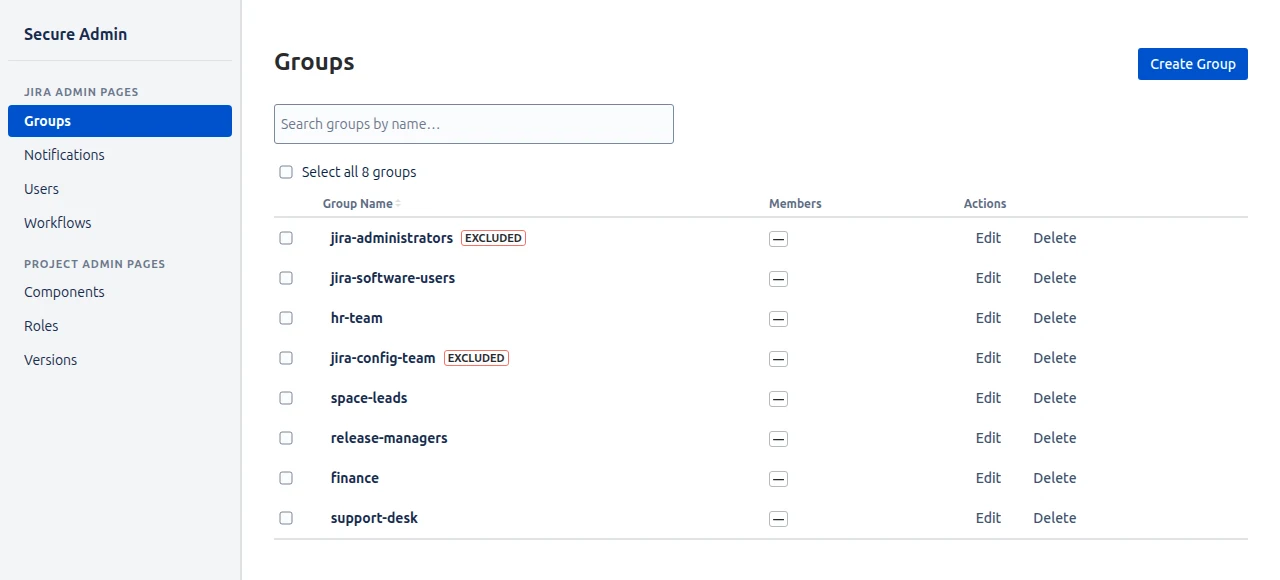
- Self-escalation blocking. The Exclude User Groups list marks groups that cannot be assigned from Secure Admin’s Groups page. Name your administrator groups there and a delegated user cannot promote themselves.
- Two ways in. Secure Admin appears in the horizontal Space menu, where the site-wide and Space pages are both available, and in the Apps menu in the top navigation, which offers the site-wide pages only.
- Secure by default. Out of the box no group has any page. Access only exists where you have deliberately granted it.
- Forge-native. Built on Atlassian’s Forge platform. Configuration lives in your own site’s storage; nothing leaves it.
Who it is for
- Sites with too many Jira administrators. Give people the one or two pages their job actually needs and take the administrator rights back.
- Sites with too few. Stop routing every group membership and version request through one person.
- Regulated environments. Segregation of duties is easier to evidence when the person who manages users demonstrably cannot edit permission schemes.
- Large Space portfolios. Space leads manage their own components, roles and versions without a central queue.
- Teams training a new administrator. Start them on one page and add more as they earn them, instead of an all-or-nothing role.
Why Secure Admin rather than the alternatives
| Secure Admin | Jira Cloud built in | Custom Forge app | |
|---|---|---|---|
| Delegate a single admin page | ✓ | ✗ | Code only |
| Delegate Space admin work | ✓ | Partly, via Space roles | Code only |
| Blocks self-escalation via groups | ✓ | ✗ | Code only |
| Configured by an administrator in a UI | ✓ | n/a | ✗ |
| Data stays in your Jira site | ✓ | ✓ | Depends |
- Granularity Jira Cloud does not have. A single page is the unit of delegation, not the whole administration section.
- No code and no scripts. One configuration screen, group pickers, Save.
- Reversible and incremental. Grant one page, see how it goes, grant another. Removing a group takes effect immediately.
Limitations worth knowing before you buy
Secure Admin is deliberately narrow, and it is better to know the edges up front:
- Access is all-or-nothing per page. You cannot grant part of a page.
- Only Secure Admin’s own pages are covered. The app does not hide or restrict Jira’s native administration screens, Space settings, or the pages belonging to other apps.
- Groups are matched by name, so a group renamed in Jira must be removed and re-added.
- Exclude User Groups applies to Secure Admin’s Groups page only.
- The app needs an active or trial licence. If the licence lapses every page reports that the app is not licensed, though your configuration is kept.
Next steps
- Read the user guide for the configuration screen in detail.
- See use cases for worked examples.
- Building an internal case? There are ready-made emails on Convince my Boss.
- Running Jira Data Center instead? See the Data Center version, which works differently.